
What are Blackboard AI Conversations?
Blackboard AI Conversations are part of a suite of tools available in the Blackboard AI Design Assistant. AI Conversations are specifically designed for students to actively participate in interaction with a Blackboard AI chat. Your Module Convenor can create an AI Conversation, outlining a topic and an AI persona, and will be able to select the type of conversation for you to engage in. Within the AI Conversation functionality, instructors can choose between two options: Socratic Questioning, in which the AI persona encourages students to think critically through continuous questioning, or Role Play, which allows students to play out a scenario with the AI persona. This tool is provided for you to reflect on topics, practice applying concepts and enhance your learning.
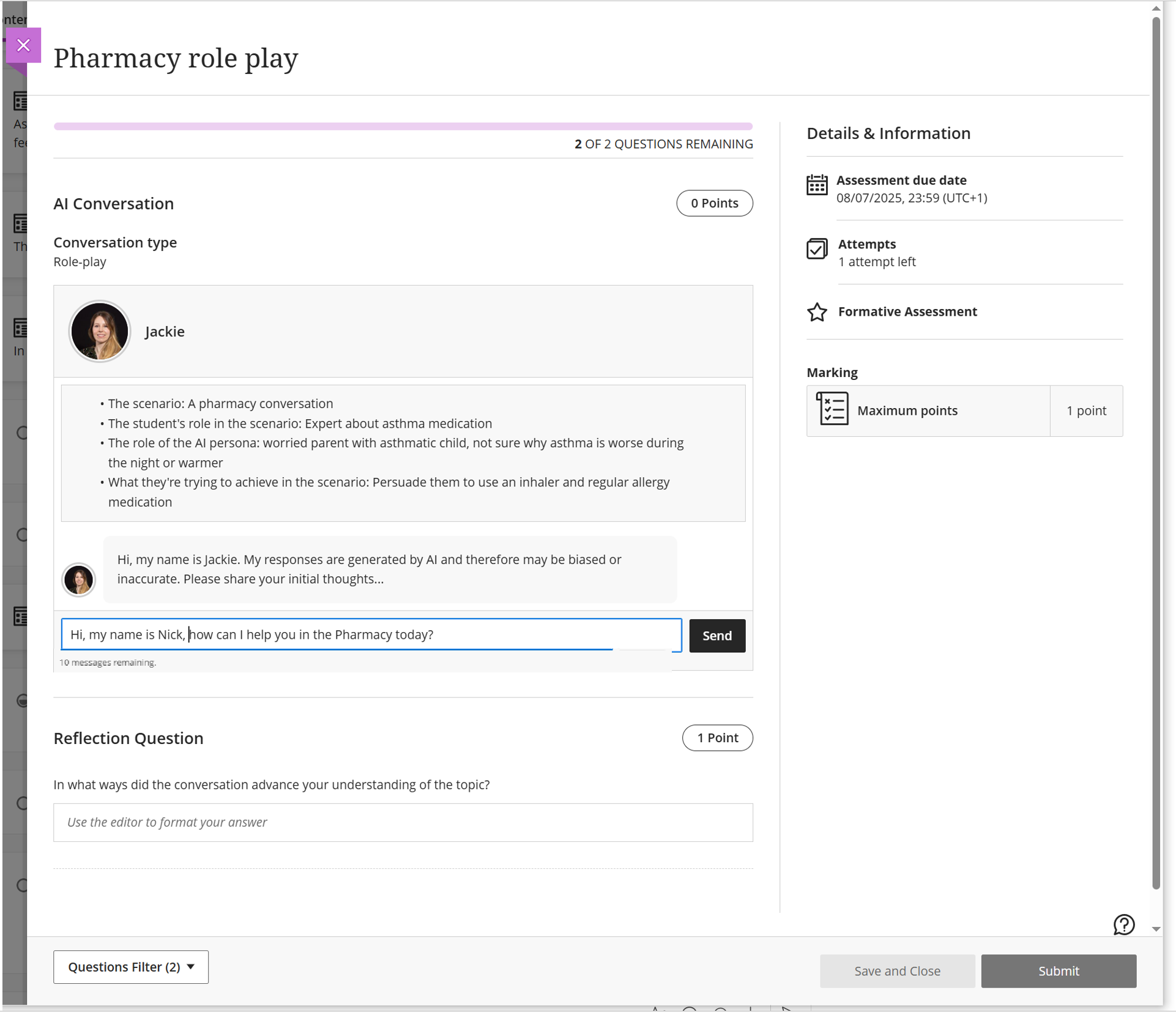
Role play
The Role Play feature allows your lecturer to create simulated conversations where you interact with an AI persona in a specific scenario. This can help you practise communication skills, explore ideas, and apply what you are learning in a more active way.
Your lecturer sets up the activity by defining the role of the AI persona and the scenario you will be working within. They can customise the persona by giving it a name, image, and personality traits, and by choosing how detailed its responses should be. These settings shape how the AI responds and how the conversation develops.
Socratic questions
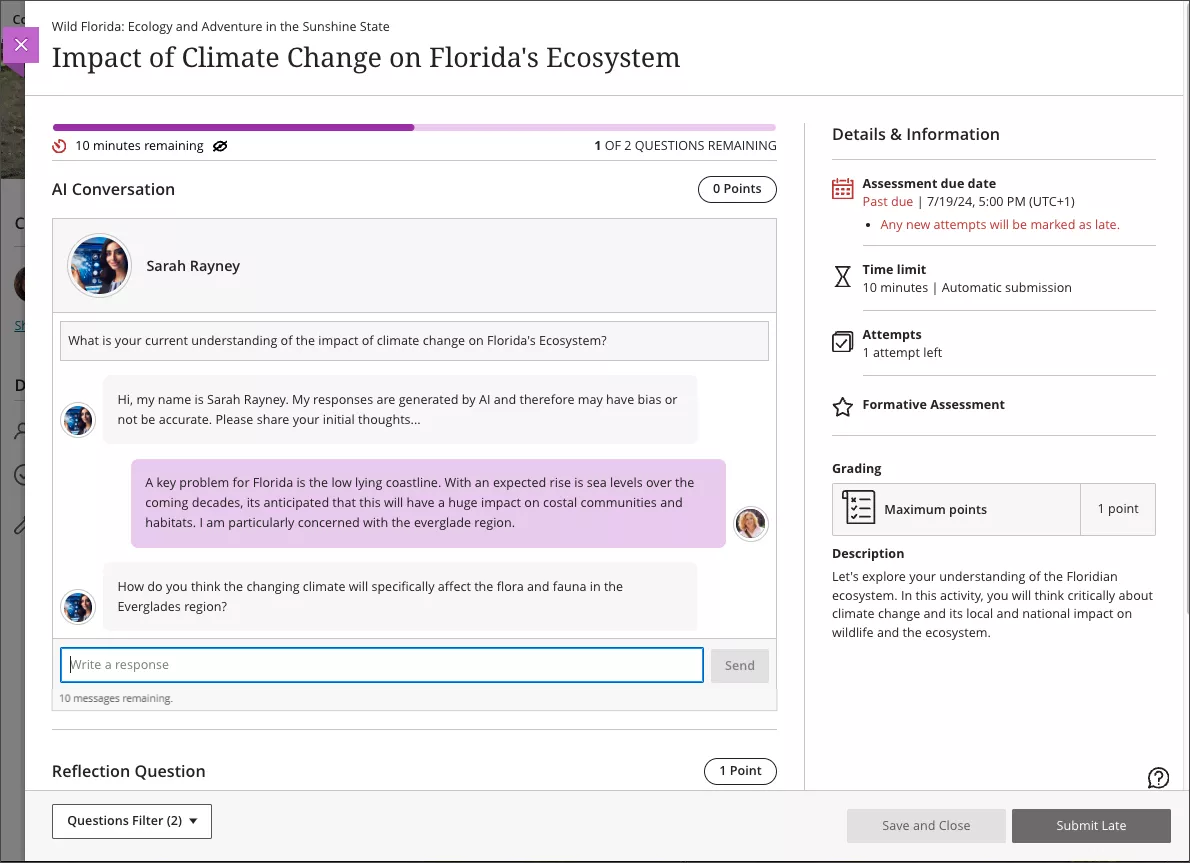
The Socratic Questions option guides you through a structured questioning activity. Instead of confirming whether your answers are right or wrong, the AI will ask a series of follow-up questions to help you explore a topic in more depth.
At the end of the conversation, you will have the opportunity to reflect on the activity. You might comment on what you learned, where your thinking developed, or whether the AI responses included bias, inaccuracies, or other issues.
When you submit the activity, your Module Convenor or lecturer will receive a transcript of the conversation along with your reflection. This allows them to see how the dialogue developed and how you engaged with the task.
Tips
Be aware the AI Conversation always starts with, “Please share your initial thoughts.” If you have not been provided with an initial starting statement, here is an example you can use:
“I am practicing my knowledge of [insert your topic title] and I want to explore [insert key question or objective]”
You will see a counter below the text box showing how many messages you have left before the conversation ends. This helps you keep track of the remaining interactions.
You may be tempted to use the prompt box to try to generate content beyond the purpose of the activity. However, AI Conversations is designed specifically to support the learning task set by your Module Convenor. Please use the tool only for the activity described in your instructions. Trying to use it for other purposes may lead to responses that are inaccurate, inappropriate, or not compatible with how the tool works in Blackboard.
In particular, the points below should be followed when prompting:
- Only use prompts that are intended to pursue the conversation regarding the assigned topic for AI Conversation. For example, respond to the questions and prompts of the AI bot or ask the AI bot questions regarding the assigned topic.
- Do not use prompts to solicit output beyond the intended functionality. For instance, you should not use the prompt to request sources or references for the output. In our testing, we determined that there are accuracy issues with such output.
- Be mindful that prompts requesting output in the style of a specific person or requesting output that looks similar to copyrighted or trademarked items could result in output that carries the risk of intellectual property right infringement.
- Suggested output for sensitive topics may be limited. The AI Design Assistant is powered by Microsoft Azure OpenAI technology which has been trained and implemented in a manner to minimise illegal and harmful content. This includes a content filtering functionality. This could result in limited output or error messages when AI Conversation is used for learning activities related to sensitive topics (for example, self-harm, violence, hate, or sex).
How are AI Conversations reviewed?
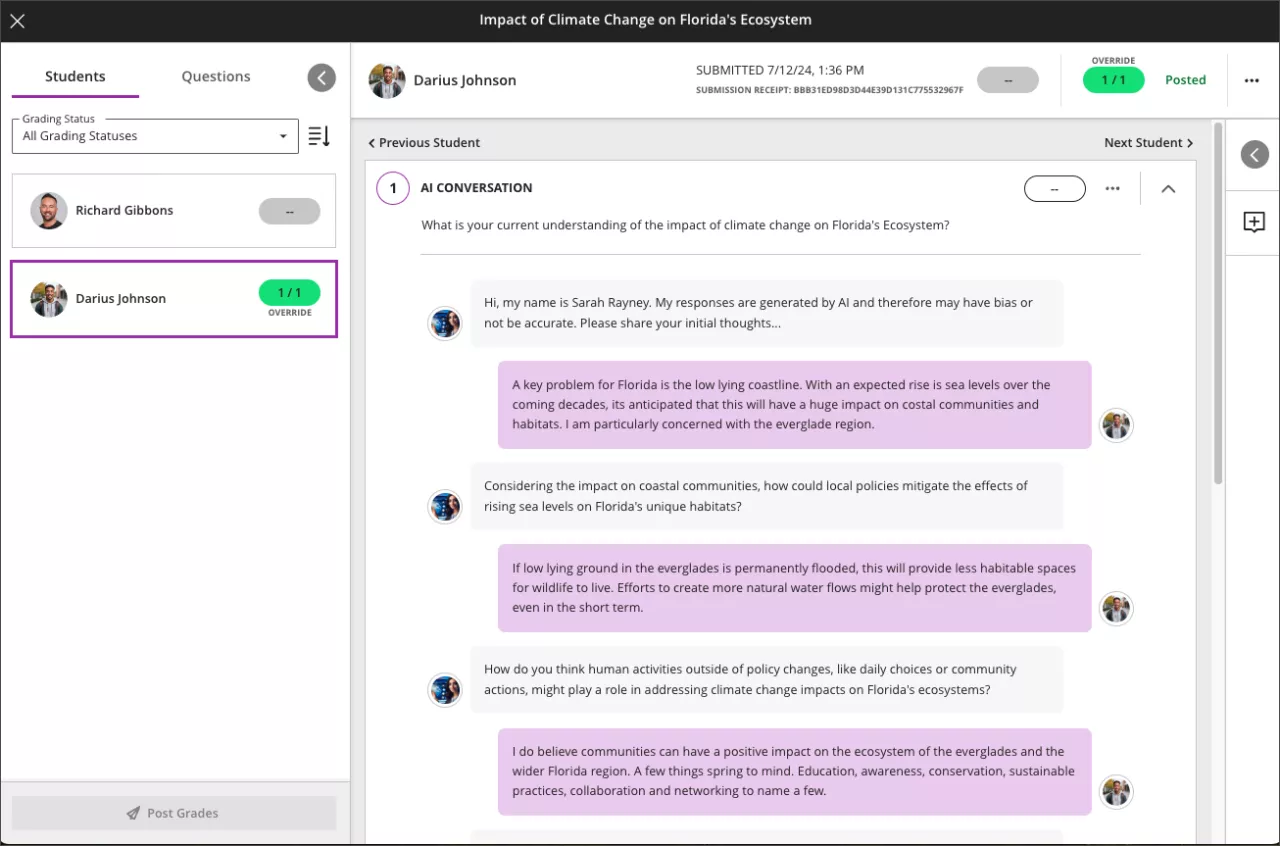
Upon completion of an AI Conversation you have the option to respond to a Reflection Question beneath the chat. You can view your submission, and a record of your AI Conversation, by clicking again on the activity title in your Course Content. Your Module Convenor can view your submission (including a record of your exchange with the AI bot) via the Course Gradebook. The academic staff view is displayed in the screenshot below, showing full details of when the tool was used, how long for and what was exchanged. Your Module Convenor may give feedback via Blackboard or the activity may be reviewed verbally as part of a scheduled study session.
Guide last updated on March 31, 2026