
What is Draft Coach?
Turnitin Draft Coach is a tool you can use within Microsoft Word (desktop app and Word Online) with your University MS365 account. It lets you produce a Turnitin Similarity Report as you work on your document to see where your text matches other online sources.
At the University of Reading, you are advised to only use the similarity checking feature. The citation and grammar checkers are limited and may not be suitable for your programme of study.
Watch this video to learn how to check your similarity score with Turnitin Draft Coach:
Key points to remember
- Draft Coach can be used within MS Word before submission to check the similarity/originality of your work. (If you need to check text from other formats, e.g. PowerPoint, you can either convert to a Word document or copy and paste text into a Word doc.)
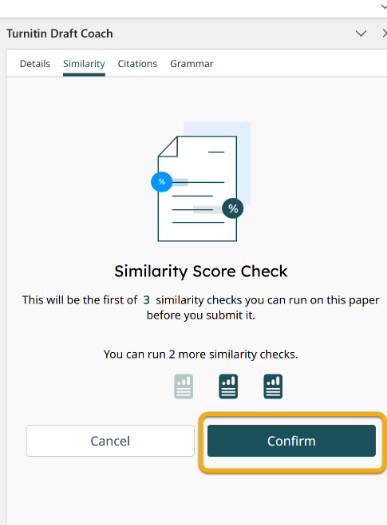
- There are three similarity checks available per document.
- Use Draft Coach for similarity checking only.
- Do not rely on Draft Coach for grammar or citation checking.
- Use Study Advice and Library resources for writing and referencing support.
- Similarity Reports highlight text matches; they do not confirm plagiarism.
- With their discipline knowledge and knowledge of the literature, your lecturers make the final judgement about originality and your academic practice. They use the Similarity Report generated by your submission to the final submission point in your Blackboard course to do this (they do not see any Similarity Reports generated for you via Draft Coach).
Accessing Draft Coach
To use Draft Coach:
- Open your document in Microsoft Word.
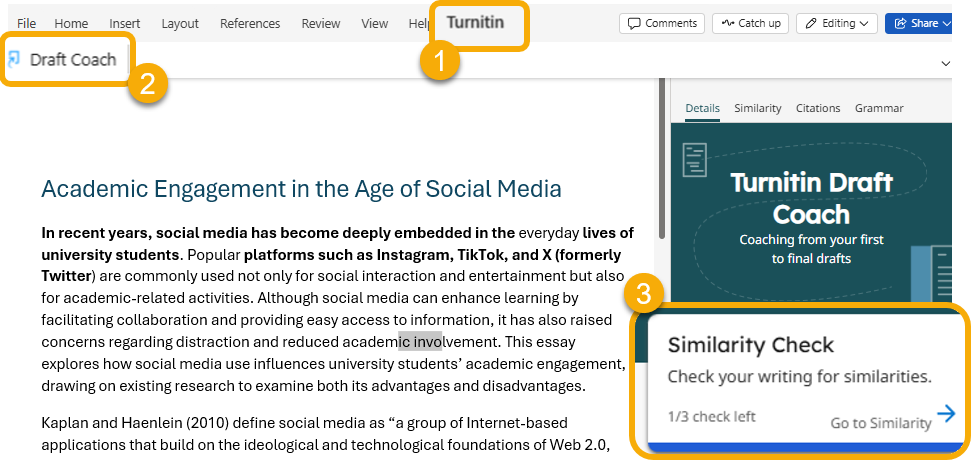
- Select the Turnitin tab from the top menu.
- Click Draft Coach to open the Draft Coach panel.
- Select Similarity Check.
Running a similarity check
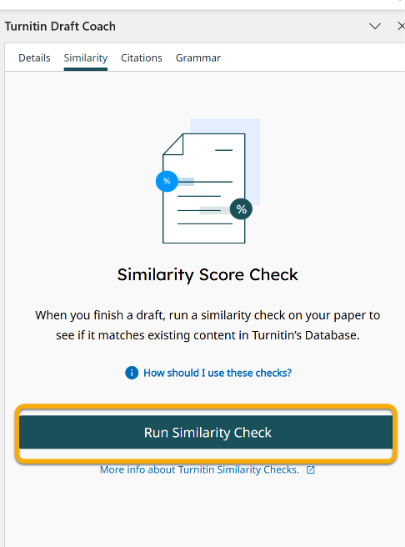
- Select Run Similarity Check, then Confirm.
- Your document will be compared against Turnitin’s databases, including:
- Online sources
- Journals and publications
- Student papers submitted to Turnitin’s repository
Within a few minutes, your similarity report will be ready to see.
Using the Similarity Report
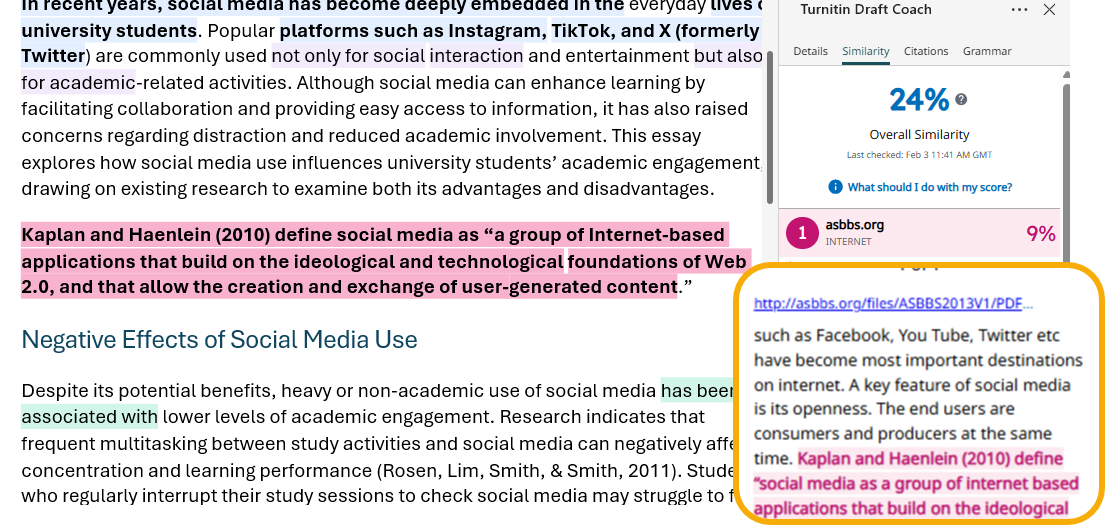
- You’ll then see a similarity percentage and highlighted matching text in your document. The highlighted text is linked to specific matches, with a breakdown showing where each match comes from, so you can review your work.
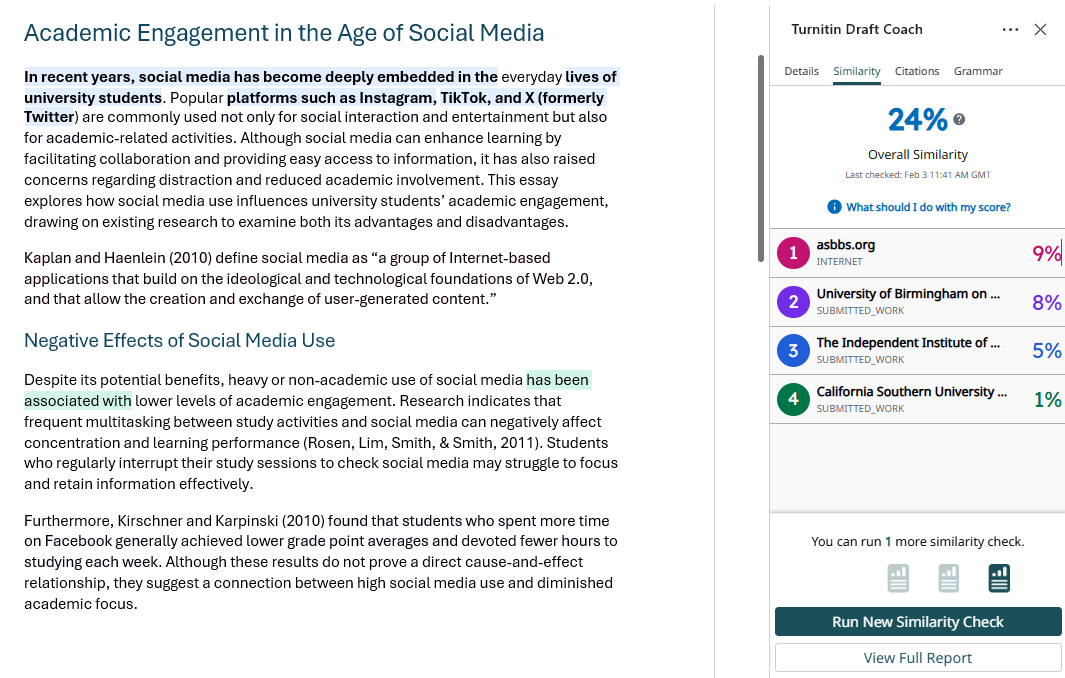
When you click on an individual match in the panel, you’ll be taken to the highlighted text in your document and shown the source it matches, so you can clearly see what was flagged and decide how to revise it.
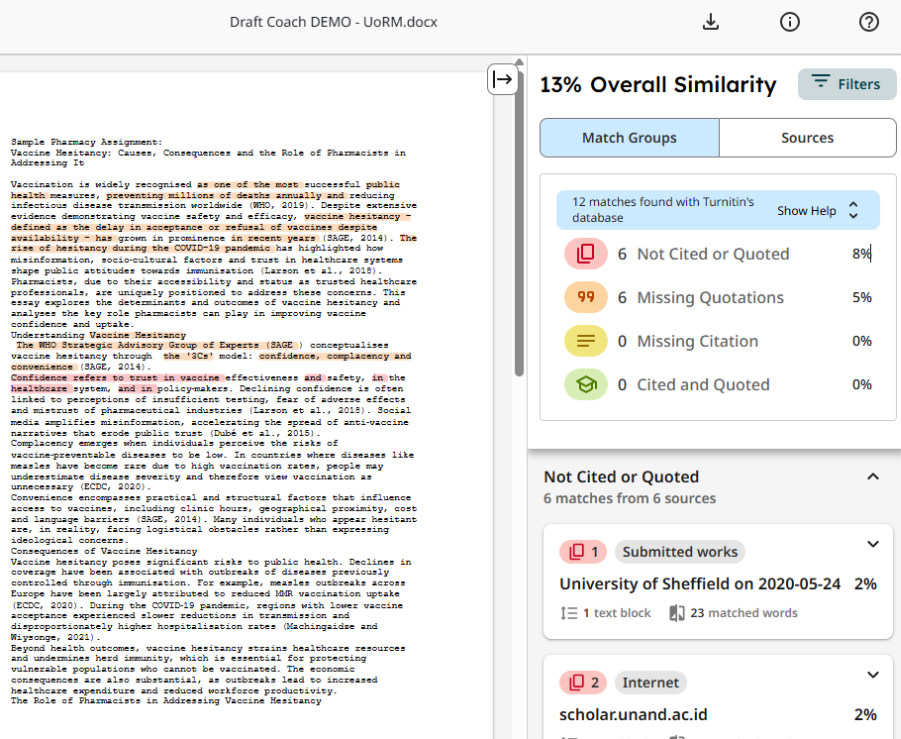
If you click Full Report, you’ll see a detailed view of all matches, including the complete list of sources, side-by-side comparisons of your text with the matching content, to help you review and revise your work. You will also be able to apply filters, e.g. exclude the Bibliography.
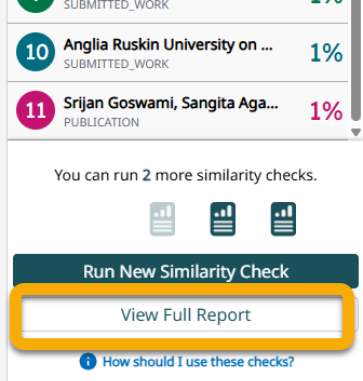
There are three similarity checks available per document, so you should only run checks when you have made significant changes to your draft.
The Similarity Report generated is private to you and your document will not be submitted to Turnitin’s repository of papers.
Interpreting Draft Coach similarity results
Draft Coach uses the same similarity matching approach as Turnitin Assignment submissions. This means:
- The similarity percentage shows matched text – it does not necessarily indicate plagiarism.
- Matches may include correctly quoted and referenced material, reference lists, or commonly used phrases.
Draft Coach can help you identify and review matches before submission, so you can check your use of sources and make revisions if needed.
If you’re unsure about how to use the similarity report to revise your work, seek advice from your tutor.
For full guidance on how similarity reports work, including:
- what different types of matches mean
- how staff interpret similarity when marking
- what high or low similarity percentages do (and do not) indicate
See How to view and interpret a Turnitin Similarity Report.
Grammar and citation tools
Draft Coach also includes grammar and citation checking features; however, we strongly advise that you do not to rely on these. The grammar checker is limited and non-discipline-specific, and the citation checker is basic and may not accurately identify referencing styles or citation errors.
Where to get grammar and citation support
For accurate and appropriate guidance, use University-approved resources instead:
- Library guides on for academic writing and grammar.
- Library ‘Citing References’ guide – for advice on referencing and citations, including example references
- Your programme or module guidance, and Library department-specific referencing guide – for discipline-specific requirements.
- Your Academic Liaison Librarian – for answers to referencing and citation questions.
After you submit your assignment
Once your assignment is submitted through Turnitin or Blackboard, you will be able to view the Similarity Report your tutor can see, if this feature has been enabled by your School/Department.
This report works in the same way as the one in Draft Coach. See How to view and interpret a Turnitin Similarity Report.
Draft Coach vs Turnitin Assignment Similarity Reports
| Draft Coach | Turnitin Assignment submission |
| Use before submission | Use during or after submission |
| Helps you review and improve your draft documents | Can be used by you and your tutor to review your submitted document |
| Limited to three checks per document | Access and ability to see a report is set by your Module Convenor |
| Is formative and not used for marking | Used by tutors to assist marking and feedback on academic integrity |
Guide last updated on March 3, 2026