
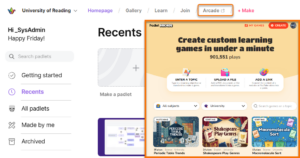
What is Padlet Arcade?
Padlet Arcade is an AI-powered free beta service from Padlet; that allows you to quickly design and adapt teaching activities for active learning, personalisation, and asynchronous engagement. It is recommended for quick ideation, to adapt your teaching in the moment, or generating ephemeral activities for short-term use with students.
- It is not an institutional service in its own right, it is a free beta service accessed via your institutional Padlet dashboard.
- The service is dedicated to developing the pre-release version of the tools; this means you have an opportunity to try them out for free, as Padlet Arcade evolves.
See our Padlet of Examples of Padlet Arcade generated materials to see the possible uses in HE teaching.
Access To Padlet Arcade
Padlet Arcade is available via the institutional Padlet dashboard (staff only) or directly via arcade.padlet.com (staff and students can access this url, no login required).
There is currently no Blackboard integration for Padlet Arcade, instead, you can share outputs with students by copying a direct link and adding it to your Blackboard Ultra module (the activity will open in a new browser tab). Additionally, the interactive learning activities allow you to share via a QR code, for quick access via a mobile device.
When to use Blackboard instead
In many cases, Blackboard Ultra tools (including Blackboard’s own AI features) may be more appropriate than Padlet Arcade. You may want to prioritise Blackboard when you:
- Need stable, repeatable activities that will be reused across cohorts or years.
- Require engagement tracking, grades, or analytics.
- Are running high-stakes assessments or activities that directly inform marks.
- Need to align closely with institutional templates, structures, and quality assurance processes.
Pedagogic framing and example uses
There is increasing emphasis on active learning and meaningful asynchronous engagement in HE. Padlet Arcade can help you explore these priorities quickly by suggesting activities and generating games that you can adapt for your context.
Examples of how you might use Padlet Arcade include:
- In-class activities: generating think–pair–share prompts, exit tickets, debate topics, or quick quizzes in response to student questions.
- Asynchronous work: creating short activities that students can complete between sessions, then sharing the link in Blackboard.
- Personalised study tasks: producing differentiated practice activities for students who need more challenge or more scaffolded support.
In all cases, Padlet Arcade should be seen as a co-designer rather than a replacement for your professional judgement. You remain responsible for reviewing, adapting, and approving any materials before they are shared with students.
Limitations and cautions
Although TDA approved for use at the university, there are some important limitations to be aware of:
- Padlet Arcade is a beta service, meaning the features and interface elements may change without notice.
- There is no direct integration with Blackboard Ultra, and no built-in gradebook or analytics tracking.
- It is not suitable for facilitation of summative assessment design or activities where long-term stability is essential. Instead, we recommend using Padlet Arcade mainly for exploratory, low-stakes, or one-off learning activities.
Data protection, privacy and responsible use
Padlet Arcade is provided by Padlet and is not an institutional service. When using it, you must follow University guidance on the responsible use of Gen AI and AI meeting tools. In particular:
- Do not enter personally identifiable information about students, colleagues, or yourself.
- Do not upload or paste sensitive data (for example, marks, medical information, or detailed case notes).
- Treat anything you generate as a draft until you have checked it for accuracy, bias, and appropriateness.
Padlet TA is covered under Padlet's existing Terms of Service and Privacy Policy. For more information, please refer to:
- Padlet’s own privacy and data protection documentation; there is a section about AI and Padlet TA in this area of Padlet's Privacy Policy. https://legal.padlet.com/privacy#whom-do-we-share-the-collected-information-with
- DTS / University guidance on using AI tools safely and ethically.
If you are unsure whether a particular use case is appropriate, seek advice from IMPS or DTS before proceeding.
Accessibility info
Padlet Arcade follows the same accessibility framework and principles as Padlet's main platform. Accessibility improvements, including screen reader compatibility, keyboard navigation, and alternative text for images, are in continuous development and apply across all Padlet products, including Arcade.
CQSD TEL Padlet Arcade Review
Padlet Arcade is not part of the Padlet University of Reading licence, however, CQSD TEL would like to offer some guidance to how this tool could fit within our learning technologies portfolio and are interested in how you may being using or plan to use Padlet Arcade in your teaching.
From October 2025 we commenced a 12 month review of Padlet TA.
- We have presented Padlet TA various interested groups to see how best to position this free beta tool.
- We have produced this guide to offer some steer and caution to how to use the AI tools in Padlet Arcade.
Our next steps would be to gather some interesting use cases for these digital games at the University of Reading,
If you are interested in using this tool and would like some guidance or if you have used it and would like to showcase your work please do get in touch with me Tara Lehane (t.m.lehane@reading.ac.uk).
Support and further guidance
If you experience technical issues with Padlet Arcade itself, you may need to consult Padlet’s own support materials, as this free tool is not a centrally supported institutional product (such as Blackboard Ultra or the institutional Padlet licence).
