
In order to access marked student work, External Examiners need to be enrolled onto the relevant Blackboard modules.
In addition, it is recommended that Departments make use of a Blackboard organisation to provide External Examiners with essential information, and as a way of sharing draft exam papers. Typically, Departments have one organisation for UG programmes and one for PG programmes
Exams Officers or Senior Programme Administrators can Request an Organisation – please specify that it is for use by External Examiners, and it will be set up as a copy of a standard template.
When enrolling External Examiners onto the organisation, please enrol them as Participants.
Recommended structure for External Examiner organisations
Blackboard Help for External Examiners
Link to the help page on this site, provided by default as part of the template.
Please note, the guidance on this page is necessarily generic – you should provide more detailed guidance to your external examiners about the assessment tools used in your School, and how feedback has been provided.
Key information for External Examiners
Provided by default as part of the template.
This is an introductory area containing
- Links which should be relevant to External Examiners on any programme.
- Information for External Examiners (link to University web site)
- Assessment Handbook (link to University web site)
- Links / documentation which you can customise to be relevant to your programme
- Awards information
Edit this link to point to the relevant awards document from Section 16-25 in the Assessment Handbook. Alternatively, you could place this information in the folder for a specific external examiner. - Programme specifications
Edit this link to point to the relevant programme. Alternatively, you could place this information in the folder for a specific external examiner. - Module descriptions
Edit this link to point to the current year and relevant School. Alternatively, you could place this information in the folder for a specific external examiner. - Key Contacts
Provide information here on the key contacts for external examiners in the School / Department and Support Centre
- Awards information
Please add any additional links or information which is relevant to all of your External Examiners.
Content areas for sharing exam papers, module details, marks etc.
Not provided as part of the template – Senior Programme Administrators and Exams Officers should liaise to agree how this content will be structured.
The best way to organise content will normally be to create top level folders labelled [External Examiner Name][Academic Year] e.g. Jo Bloggs 2023/24. All information and content for that examiner should be placed inside the folder. You can create a sub-folder for each module that they need to examine. The layout will look something like this:
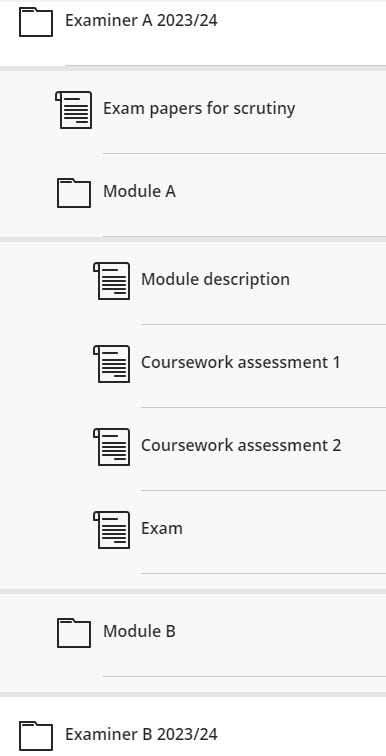
Managing External Examiner folders
- To make it easier for each External Examiner to access the content relevant to them, you could use Release Conditions to limit who can see each folder.
- Once the entire assessment cycle is complete for an academic year, you can hide the folders for that year, so that your External Examiners see only current information.
Providing access to marked work
External Examiners are entitled to view all submitted and marked work. There is no need to upload this work to the Organisation, you can add a link to the course or even directly to the Gradebook Grid view for the relevant course.
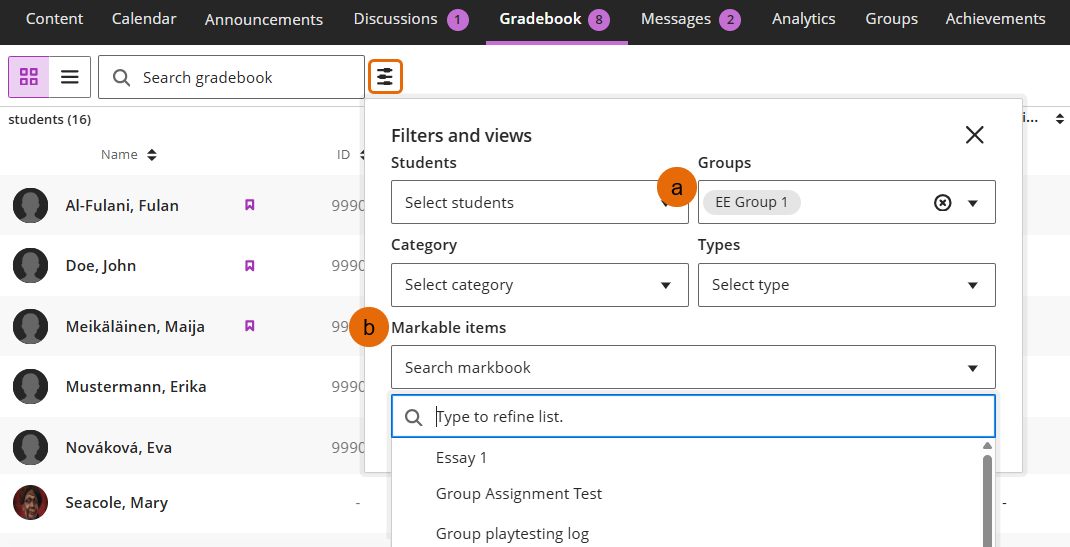
Once in the Gradebook Grid view for the course EEs can use the filter to find the assessment and/or students they need to view.
- Create a Group of students in the sample set
- Prompt EEs to use the filter in the Gradebook when you signpost them to the relevant courses
Guide last updated on August 11, 2026