
What is Draft Coach?
Part of the University’s Turnitin licence, Draft Coach is an add-in to Microsoft Word that produces a Turnitin Similarity Report based on the text in the document.
It allows students to independently generate a Similarity Report to check their work and give them feedback as they write prior to submitting assignments to Blackboard. They can run the check 3 times per document.
Draft Coach uses the new Enhanced Similarity Report to help students understand the matches they see in their work and learn from these to improve their academic writing.
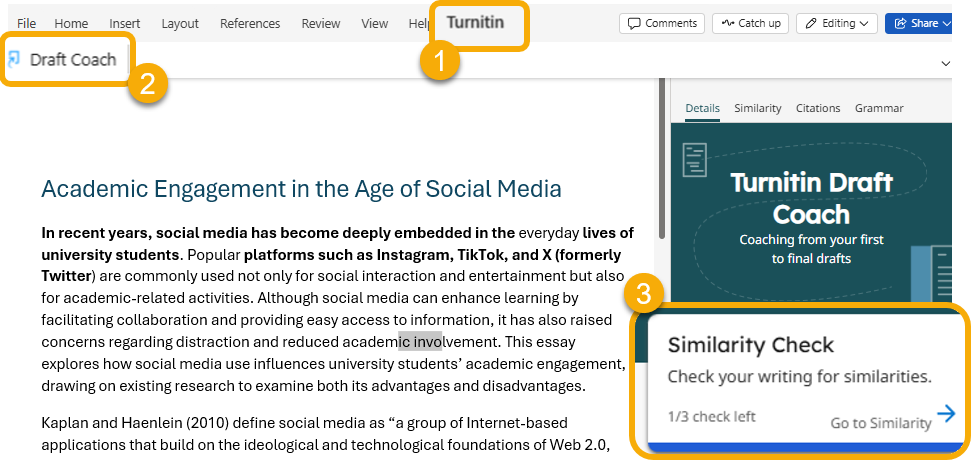
Students (and staff) can access Draft Coach by opening their document in Microsoft Word or Word Online, selecting the Turnitin tab, clicking Draft Coach to open the panel, and choosing Similarity Check:
How does the Similarity Report work?
The Similarity Report, whether generated via Draft Coach or a Turnitin Assignment submission point, simply identifies text in an assignment that matches sources in Turnitin’s databases. (If accessed via Draft Coach, it does not submit the document to Turnitin’s repository of submitted assignments.) The Similarity Report does not necessarily indicate plagiarism. In this way, students are still required to make decisions about their work when they see the report. Whether a student has plagiarised remains your academic judgement when marking the assignment. For more guidance on using and interpreting the Similarity Report, including what similarity percentage score means, see the Staff guide on interpreting the Turnitin Similarity Report.
Grammar and citation tools in Draft Coach
Draft Coach also includes basic grammar and citation checkers. These general tools don’t provide discipline-specific writing feedback or identify errors for all referencing and citation styles. Students are being directed to use more effective University-supported tools and the guidance from Study Advice.
Please advise students to use Draft Coach for similarity checking only as indicated in the student guidance on using the tool.
Points to remember
- Draft Coach is for formative use only: it’s a student-facing drafting resource intended to assist academic writing skills before submission.
- You cannot see Similarity Reports or checks generated by Draft Coach: These do not feed back into Turnitin. You can see a Similarity Report when the assignment is submitted for marking to help you judge its academic integrity.
- Draft Coach does not submit to Turnitin’s repository: Running reports via Draft Coach will not affect the student’s final Turnitin Similarity Report once they submit their assignment.
How to support students
- For step-by-step guidance on accessing and using Draft Coach, signpost students to the TEL Student guide to using Draft Coach.
- Integrate the use of Draft Coach into a relevant module as a formative exercise to offer opportunities to discuss your expectations, guide effective use and tackle common citation mistakes.
- Remind students that Draft Coach is not a replacement for final Turnitin similarity checks through Blackboard/Turnitin Assignment submission points in the Blackboard course.
- Encourage effective use by suggesting students spread out similarity checks across drafts and use the three available checks meaningfully.
- Emphasise that similarity percentages reflect matched text, not necessarily plagiarism, and that correct citation and paraphrasing practices are important.
- For academic writing or referencing support, direct students to:
The following template slides have been created for you to use with students:
Share this video with students to guide them on checking similarity with Turnitin Draft Coach.
Guide last updated on March 3, 2026