
What is a Turnitin paper view request?
The University and many other UK institutions use Turnitin to check the similarity of students’ work against various web sources and the work of other students. Papers submitted by students are added to a national repository to enable matches to be made to them in the Similarity Report.
It is not possible to immediatley see the source of the match to another student’s paper unless you are enrolled on the Course in Blackboard to which it was submitted. Only the name of institution is shown if you don’t have access, but you can make a request to see the paper.
The request is an automated email sent to all Instructors on the course in which the paper was originally submitted. It asks permission to see the full text of the paper.
A request can be made by someone:
- In the University: If the colleague is not enrolled on the course in Blackboard where the paper was submitted.
- Outside of the University: At another UK educational institution.
University of Reading students are made aware that their work may be used for this purpose on the Data Protection Fair Processing page of the Student Handbook. Copyright of the work remains with the student author.
It is up to you to decide if you should grant permission following the approved procedure below to meet UK Data Protection and Copyright legislation.
When would you accept or decline a request?
The University considers it beneficial to permit such requests, where appropriate, in order to maintain academic integrity and to encourage reciprocal arrangements with other institutions.
A significant single match in a paper can potentially indicate academic misconduct and require investigation, but there may be other reasons, for example, if both students have independently quoted directly an unlisted text or article source that is not part of Turnitin’s internet database.
The email request you receive will indicate the overall percentage match to the corresponding paper and include the full text of the work requested. It does not show where the match occurs or provide you with the details of the work from the other institution.
To determine if you should accept or decline a request:
- Consider the type of assignment, the context of the paper (for example, is it likely to be a large number of smaller matches to standard phrases)
- The length of the work in proportion to the percentage match (for example, 20% of a 5000 word assignment would be a significant match).
General guidelines:
It may be necessary to ‘Query the Request’ and correspond with the person requesting the paper to obtain more information before making a decision on whether it is appropriate to accept a request, see the procedure below.
Accept:
- High percentage match between 70-100%.
- Significant match 30-70% that is likely to be a single passage of text.
- Significant match where the source has been correctly referenced in the University of Reading student’s paper. (This may help the person requesting the paper identify an un-referenced source in their student’s paper.)
Decline:
- Small percentage matches between 1-10%.
- If the paper contains sensitive or private information and data.
- Matches to the bibliography.
- Matches to sourced text in appendices.
- The paper is a predominantly a personal reflection or original research.
Procedure for responding to a paper view request
In order to ensure you comply with UK data protection and copyright legislation, please follow the approved procedure below.
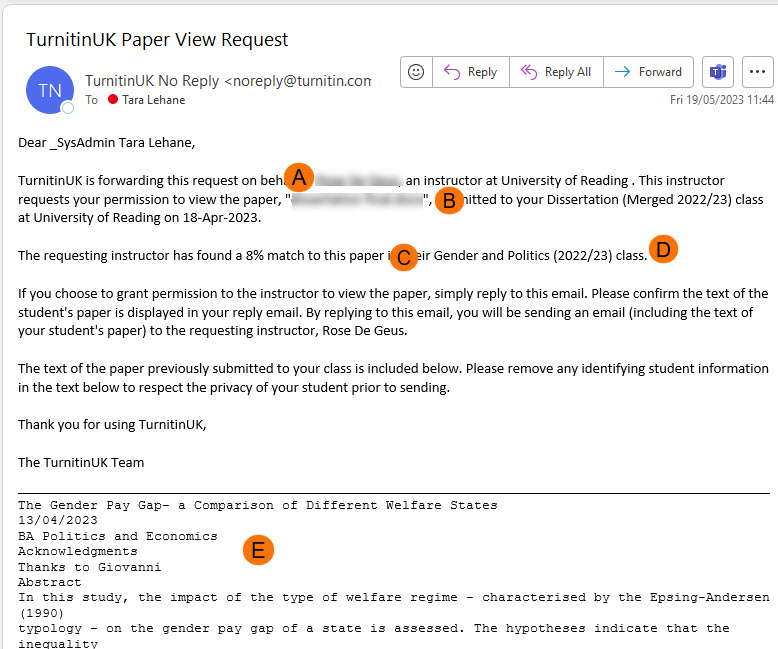
Emails are titled ‘TurnitinUK Paper View Request’ from email address TurnitinUK No Reply (noreply@turnitin.com). All Instructors enrolled on the course in Blackboard where the assignment was submitted will receive the email.
The email contains the:
A. Name of the person requesting and their institution,
B. Title of the paper being requested and the Blackboard course it is in,
C. Size of the percentage match,
D. Name of the requester’s Course,
E. The full text of the student paper being requested.
Steps:
1. Identify the module that the paper was submitted to, where possible.
2. Refer the email to the relevant Module Convenor to make a decision on whether to grant permission. Where you have advice on whether permission should be granted, please indicate this to assist the decision.
3. The Module Convenor decides whether or not to accept request.
Decline a Request
- No further action is required and delete the email.
- Be Aware: If you reply to the email, permission is deemed as being granted, as the email contains the full text of the requested work and is sent directly to the person who has made the request.
Accept a Request
Do the following:
4. Select one person to reply to the original email.
5. Before sending the reply email, this person should remove any information that identifies the student throughout the text of the student’s work. (For example: student name or student number)
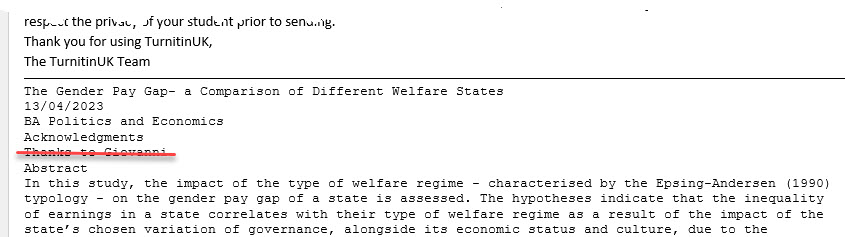
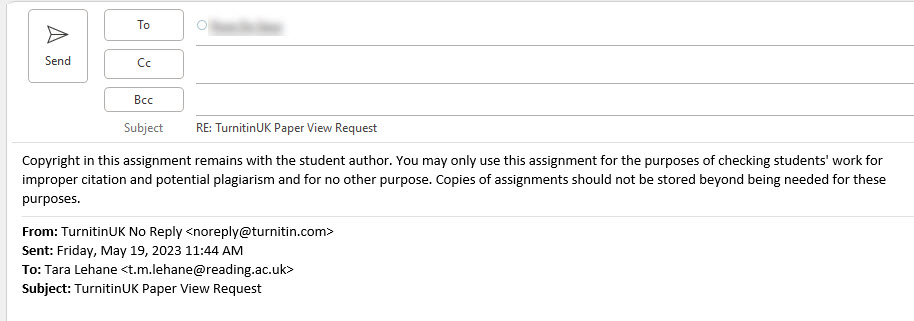
6. Copy and paste the following Copyright Statement to the top of your reply:
Copyright in this assignment remains with the student author. You may only use this assignment for the purposes of checking students’ work for improper citation and potential plagiarism and for no other purpose. Copies of assignments should not be stored beyond being needed for these purposes.
Querying a request
If you need to correspond with the person who has requested the paper before deciding if you want to permit the request. You will need to:
- Reply to the email and include your own contact details so they can contact you seperately.
- Delete the text of the student’s paper from the reply, so it is not included.
Guide last updated on May 30, 2023