Reflections on using the Blackboard AI Conversation Tool

Find out how Global Academy Lecturer, Brian Turner, has used the Blackboard Socratic Questioning Chatbot feature (part of Blackboard’s AI Design Assistant) in a class, and his thinking on its broader T&L application and meta-use for multiple T&L outcomes.

Overview

I used the Blackboard Socratic Questioning chatbot in my International Foundation Programme Academic English class (1) as a tool as part of the early stages of the process of students generating ideas for a summative essay project, and (2) for student to briefly reflect on the usefulness of the tool itself.

Objectives

  • For students to use the Socratic Questioning chatbot to generate ideas for their summative essay project;
  • For students to then reflect on its use and evaluate how much, if at all, it helped them,
  • Brief class discussion on the two points above but also on the nature and ethics of AI.

Context

I used the Blackboard Socratic Questioning chatbot in an IF0AE2 – International Foundation Academic English class. I wanted to try it as beckoned to by a CQSD session I attended soon after it had been developed and introduced, but also to measure and evaluate student engagement with it as a new possible lesson tool.

Implementation

During Semester 2 of AY 2025-26, I used the Blackboard Socratic Questioning chatbot tool as a means for students to generate ideas in the early stages of their summative essay. Further, I also wanted them to reflect on the use and usefulness of the tool. Two prompts were set:

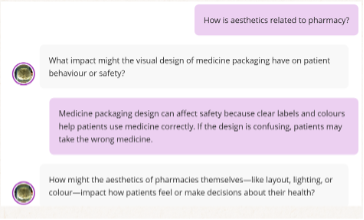
  1. Use this chatbot to work out a focus for your essay to link the theme of aesthetics to your discipline.
  2. In what ways did the conversation advance your understanding of the topic?

The ‘AI persona’ was set at the default basic of ‘Supportive’ to reflect the scaffolded nature of the class and indeed my pedagogic approach (plus set up was within limited time resource).

Remembering advice from the session I attended, I set ‘Complexity of responses’ at middle level to reflect an appropriate level for a language class.

Afterwards, we had a brief discussion to reflect on the activity and the tool.

Impact

There were varying degrees of engagement with the tool. 4/6 students used it, but 2 abstained, possibly as ‘conscientious objectors’. Some engagement with the first prompt was done a little ‘flippantly’…

…but otherwise, it was used more in the spirit intended.

For the reflective prompt, 3 of the 4 left comments noting a positive experience. In this sense, the activity leant mostly on the side of objectives being met.

However, I also detected a slight reluctance from the students to use it again. This irony does exhibit an interesting phenomenon though, that students will vary their responses to the same event, depending on the ‘format’.

Reflections

It was successful in that most students present engaged and noted the tool’s usefulness. It also allowed discussion around the nature and ethics of AI, wherein we shared our knowledge and views on the AI phenomenon. In the future, I will dig deeper into this element.

My conscientious objectors’ reservations had environmental and data concerns. Next time however, I will be better able to signpost the TEL Guidance and UoR’s assurances RE sustainability, energy use and DP. Discussions around these issues are essential, and indeed teacher-student dialogue thereof is a vital conceptual arena and element in creating a collaborative classroom and safe space. This thus all falls within my key pedagogic approaches of student belonging, whole self teaching, exploring wider T&L opportunities and transformational leadership.

In the future, I will experiment with AI personas and the Role Play tool with an aim to improve value and engagement. In my personal use of ChatGPT, which in some instances I have turned into lesson materials to on using GenAI critically, I often have it adopt a persona or two. One example is when I had philosopher Socrates and fictional character Uhtred from The Last Kingdom books/show discuss veganism. In content lessons, to have the AI speak in the persona of someone students are studying creates great opportunities for students to assess how accurate the AI is against their knowledge of the person and their works. This is also the case with contextual information also. This are points I intend to incorporate in later uses of these tools.

Follow up

Though I was unable to develop the activity further or indeed use it or the Role Play chatbot again due to limited time resource, I have signposted them in the teacher notes of the new module materials that have been developed for AY 2026-27. Again, I intend to explore the persona function more to have students test content knowledge in their own fields. I will also give more options to the students, i.e. they can choose the kind of persona, e.g. supportive again, or perhaps authoritative, depending on what the tool allows.


Further information

CQSD TEL guidance: Blackboard AI Design Assistant AI Conversations

University of Derby: Enhancing student engagement with Blackboard’s AI Conversation Tool

Using Blackboard AI Design Assistant to Enhance Students’ Engagement

Find out how Hanan Hamad from the School of Pharmacy and NHS has used Blackboard’s AI Design Assistant to enhance student engagement in MPharm ‘Prescribing in Practice’ workshops.

Overview

To improve student engagement with pre-session learning materials, Blackboard’s AI Design Assistant was used to redesign the online learning environment for a Prescribing in Practice workshop within the MPharm programme. The redesigned Blackboard page resulted in increased student engagement, attendance and highly positive student feedback.

Objectives

The activity aimed to:

  • Increase student engagement with pre-session Blackboard materials;
  • Improve attendance at Prescribing in Practice;
  • Create a more attractive and intuitive online learning environment;
  • Encourage active learning through AI-generated formative knowledge checkers,
  • Evaluate the impact of the Blackboard AI Design Assistant on student engagement and learning experience.

Context

Prescribing in Practice workshops are delivered to MPharm students to develop clinical examination, patient assessment and prescribing skills in preparation for Objective Structured Clinical Examinations (OSCEs). Despite their importance, student engagement with pre-session Blackboard materials and workshop attendance had been lower than anticipated, prompting exploration of strategies to enhance participation.

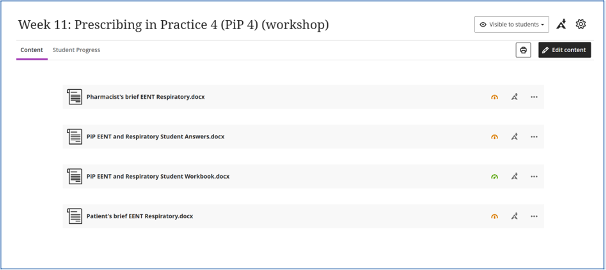
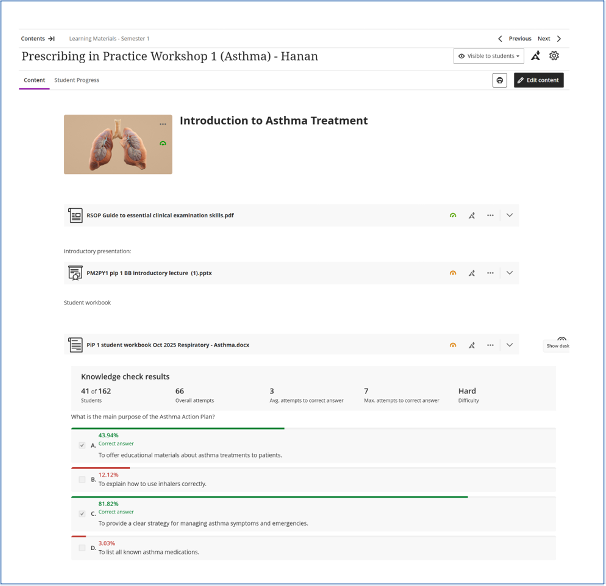
Figure 1: Blackboard page prior to using the AI Design Assistant tool. 

Figure 2:  Student engagement with the page prior to using AI assistant tool.

Implementation

Following attendance at a CQSD TEL workshop introducing Blackboard’s AI Design Assistant, I redesigned the Blackboard session page for one Prescribing in Practice workshop. Rather than uploading resources within a standard folder structure, the AI Design Assistant created a visually engaging, well-organised learning page with clearly structured content and improved navigation.

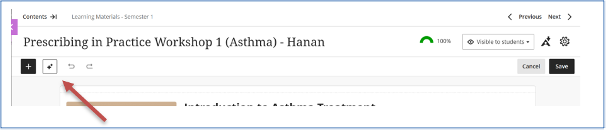
Figure 3: Where to find AI assistant tool.

Figure 4: designing the page with the AI Assistant tool.

I also used the AI-generated Knowledge Checker to create formative multiple-choice questions based on the uploaded learning materials. Students were encouraged to complete these activities before attending the face-to-face workshop to reinforce key concepts and .identify areas requiring further study.

Student engagement with the Blackboard page was monitored using Blackboard Analytics and compared with a previous delivery of the same workshop where the AI Design Assistant had not been used. Attendance data and student feedback collected after the workshop were also reviewed to evaluate the overall impact of the redesigned online learning environment.

Impact

The redesigned Blackboard page was associated with a marked improvement in student engagement. Blackboard Analytics showed that 76.5% of students accessed the AI-designed learning page compared with 40.1% for the equivalent workshop without AI support.

Figure 5: students’ engagement after using AI assistant tool

Completion rates also increased from 9.2% to 11.7%. Workshop attendance improved to 73.8% from 61.3%, suggesting that greater engagement with pre-session materials encouraged participation in face-to-face teaching.

Student feedback was overwhelmingly positive, with learners describing the workshop as engaging, well organised and highly relevant to clinical practice. Many valued the opportunity to practise prescribing and clinical decision-making within realistic scenarios, while also appreciating the supportive teaching approach.

Reflections

This initiative demonstrated that relatively small changes to the presentation of online learning materials can positively influence student engagement. The Blackboard AI Design Assistant significantly reduced the time required to create an attractive and structured learning environment while maintaining full academic control over the educational content. The AI-generated Knowledge Checker was an unexpected benefit, providing students with an accessible method of self-assessment before attending the workshop.

Although improvements in engagement and attendance cannot be attributed solely to the AI Design Assistant, the combination of enhanced online resources and interactive face-to-face teaching appeared to support better student preparation and participation.

Follow up

Student suggestions, including providing additional guidance during prescribing exercises and making supporting resources easier to locate, will inform future iterations of the workshop. I intend to extend the use of Blackboard AI Design Assistant across other clinical skills sessions and continue evaluating its impact on student engagement and learning outcomes.


Further information

CQSD TEL guidance: Blackboard AI Design Assistant

Evaluation and impact planning shifted our focus: what UoR staff and students told us about Blackboard Ultra & how TEL responded 

Evaluation and impact planning shifted our focus: what UoR staff and students told us about Blackboard Ultra & how TEL responded 

An institution-wide evaluation of the university move to Blackboard Ultra, and what the data surfaced about course design, student belonging and inclusion. 

By: Jacqueline Fairbairn SFHEA and Emma Herrod SFHEA
Technology Enhanced Learning, Centre for Quality, Support and Development
 

 Excerpt 

“Rather than simply evaluating a platform, we found ourselves exploring how everyday Blackboard practices shape the student experience.” 

Overview 

The University moved every programme onto Blackboard Ultra in 2024/25. The Technology Enhanced Learning (TEL) team used the switch to Ultra as an opportunity to create a more accessible and engaging digital learning experience for students by introducing a new institutional course template, promoting more consistent course design in Blackboard, and encouraging new approaches to teaching and learning across the University. 

After the first academic year of use, we wanted to know if the anticipated benefits were realised, so we ran a mixed-methods evaluation with staff and students. 

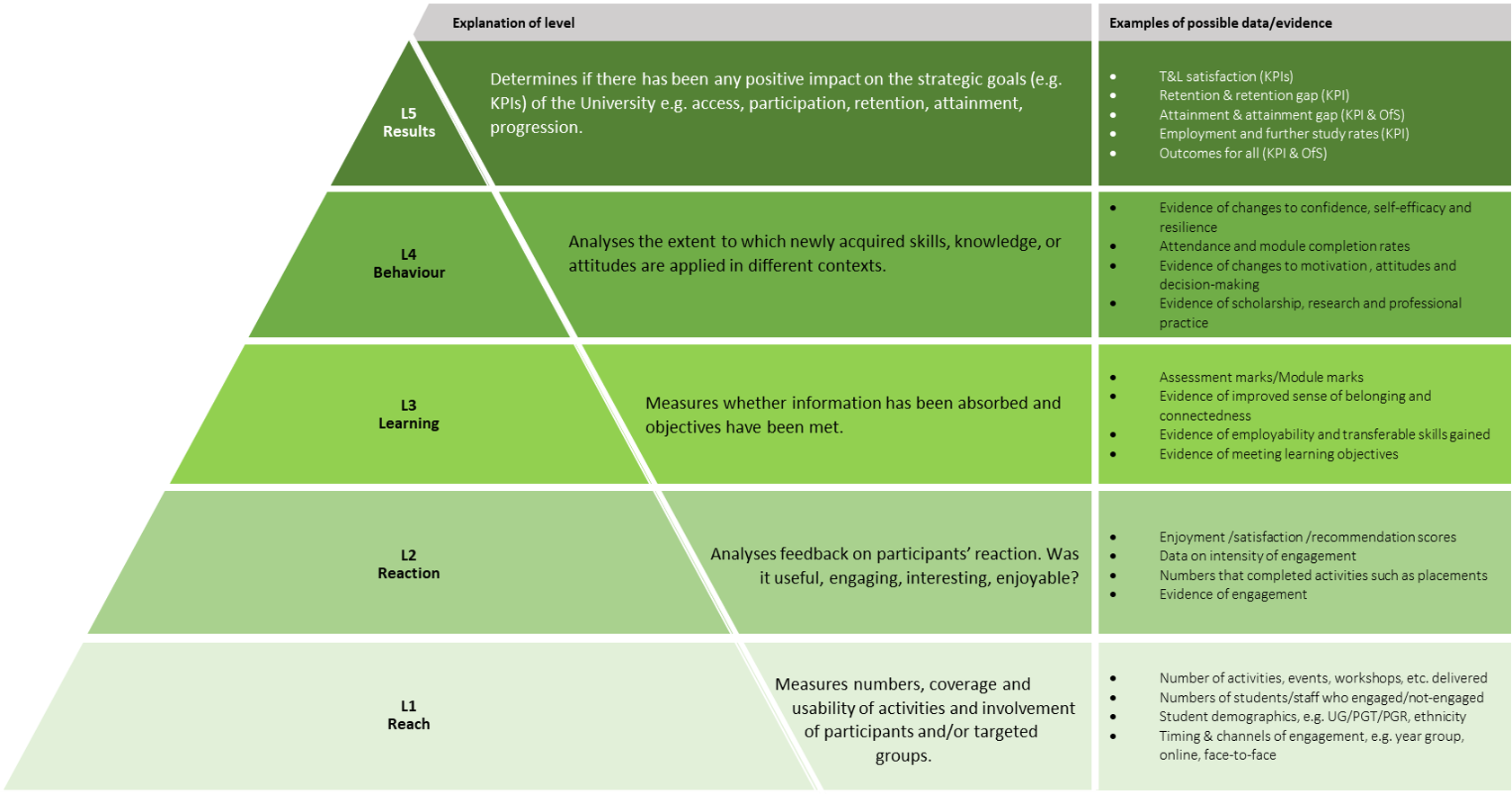
We found it useful to think about our evaluation using the Five Levels of Impact model. Our surveys and focus groups gave us plenty of evidence around Reaction and Learning, whether staff and students found the new features helpful, and whether they felt more confident using Blackboard.  

What surprised us was how far the qualitative data pushed us up the evaluation model towards Behaviour. These were changes in confidence, independence, and sense of belonging, particularly for widening participation (WP) students already navigating other barriers. Students talked about greater confidence, independence and belonging, particularly those from groups already navigating additional barriers to learning. 


Objectives 

  • To understand how staff and students were experiencing Blackboard Ultra and the new institutional template, beyond simply whether people could use the system. 
  • To find out whether the move to a clearer and more consistent course structure was landing as intended, particularly for WP students. 
  • To use what we learned to shape our Technology Enhanced Learning (TEL) support and guidance, and to feed evidence-informed findings into wider institutional conversations about the role of Blackboard in teaching and learning. 

Context 

The University is a medium-sized HE institution, so the move to Blackboard Ultra was a significant undertaking with over 27,000 students, around 1,300 academic staff, and colleagues teaching across the UK, Malaysia and China; from a TEL perspective we support more than 2,300 Blackboard courses. All 14 academic Schools moved to Blackboard Ultra at the same time. We supported this with over 160 staff development sessions (650+ staff trained), roadshows across Schools, and a network of Ultra Champions. 

Alongside the migration, we introduced a standard institutional course template, built around  

  • a flat structure that limited folder nesting 

These choices aimed to reduce cognitive load, make things easier to find, and support more intentional course design, rather than Blackboard functioning as a file repository.  

Implementation 

For our evaluation data, we took a mixed-methods approach because we wanted both the breadth of a survey and the depth of user discussions.    Implementation diagram
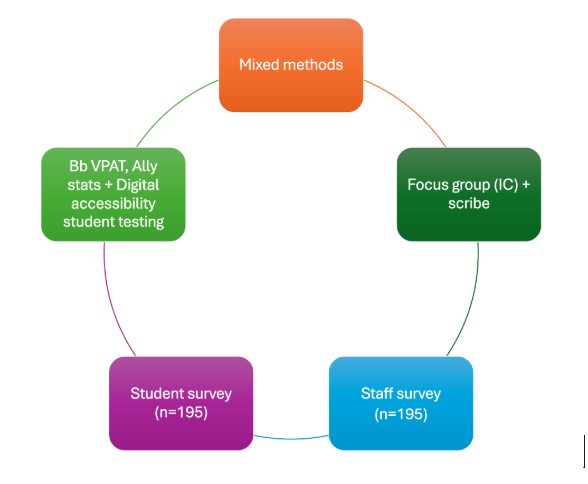
  1. Focus group: we met with ten of the university’s student Inclusion Consultants, with a scribe on hand, and asked them to walk through their own Blackboard courses live, narrating what was helpful and what wasn’t. 
  2. Written reflections: the same students followed this up with independent written reflections via Padlet, which gave us further material for thematic analysis. 
  3. Staff and student surveys: we ran an institutional survey (195 staff, 195 students), combining Likert-scale and open-response questions. We piloted the questions with student partners and our TEL practitioner forum first, which led to some useful revisions around terminology and question ordering. 
  4. Platform and accessibility data: we drew on Blackboard’s Ally statistics and worked with our digital accessibility officer and student volunteers to test a sample of courses, focusing specifically on instructor practice rather than the system’s built-in accessibility. 

We were interested in three things in particular: how helpful people found Ultra’s features; how well the new template supported navigation and wayfinding, and what people thought of our TEL support and guidance. The aim was to produce a descriptive, exploratory piece of work to surface insights about how Blackboard Ultra was being adopted. 

Impact 

For instructors; the main headline was that staff confidence in using Blackboard was consistently higher than their confidence in designing Digitally Enabled Learning within it. Under time pressure, a lot of modules were understandably starting out as content repositories rather than properly sequenced learning spaces. Feature usage backed this up:  

  • two-thirds of staff weren’t using Bulk Edit;
  • half weren’t using the course search bar,  
  • a quarter weren’t using Ultra Documents at all, often because the priority was simply getting content moved across rather than redesigning it. 

For students; the picture was more nuanced once we broke it down by widening participation group: 

Black, Asian and other minority ethnic students reported particularly strong positive perceptions of the new template, around ten percentage points above the overall baseline on questions about navigation and wayfinding. Their comments suggested Blackboard was helping them navigate academic expectations more broadly, not just locate files. 

“From a learner’s perspective, Blackboard functioned as a centralised academic hub, enhancing the coherence and self-regulation of my study practices.” 

Commuter students particularly valued features that supported quick, flexible, just-in-time engagement such as announcement pop-ups, a consistent mobile view and the course search bar. For these students, clear structure wasn’t just convenient, it helped them be more strategic with their time. We were struck by how much they wanted to see active lecturer presence in their courses; they liked feeling connected to the module as it unfolded. 

“Being able to use my phone and still have the same layout really helps me stay on track when I’m commuting.” 

 Students reporting a long-term health condition or learning difference told a different story. This group was furthest from positivity averages and showed the greatest sensitivity to inconsistency in layout, file naming and assessment visibility. They valued the system update itself, but inconsistent instructor practice within the course template was amplifying anxiety rather than easing it. 

“Overall, I believe the update of Blackboard Ultra to have been a significant factor in terms of easing my anxiety about my studies and examinations this year.” 

“Sometimes the assignment info was a bit all over the place, across different [template] sections, which made it difficult to make sure you’d read all the information needed.” 

 Taken together, the message was consistent (even where the experiences differed); clear, predictable course design changes how confident and connected students feel, and the effect is more strongly experienced by students who are already navigating additional barriers to learning. 

Outcomes: what can teaching colleagues do? 

The evaluation surfaced a set of small, low-effort changes instructors can make that have a real, positive impact on belonging and the learning journey. None of these require redesigning a module from scratch: 

  1. Use meaningful file naming. Keep titles predictable, short and distinct, so students can wayfind easily, including on mobile. 
  2. Use the file description field. A brief description helps students orientate themselves and understand what they’ll find in a resource before they open it. 
  3. Give a sense of ‘you’. Students value knowing their lecturer is present in the course; a conversational tone, or a short video or audio update, goes a long way. 
  4. Combine files in Ultra Documents. Avoid long lists of separate files; use Ultra Documents to guide students through content in sequence. 
  5. Aim for anti-scroll Ultra Documents. Keep them short – they should ‘feel’ like an A4 sheet of paper, not an endless scroll. 
  6. Uphold consistency. Stick to consistent course structures and templates so students can find information quickly, week to week and module to module. 
  7. Schedule release of content and announcements. Timed releases help guide students through the module as it unfolds, rather than leaving everything visible at once.

Reflections 

What made the evaluation project useful was resisting the urge to treat it as a checklist of requirements met. The questions that mattered most we not “do people like the updated system”, but “how do everyday practices affect user’s experience”. 

If we were doing this again, we would like to find a more systematic way of following up with the WP students whose experiences diverged most, particularly students with a health condition or learning difference, where the gap between intention and instructor practice was most distinct. 

One thing we didn’t anticipate was how far the findings would travel. We’d planned this as a local, TEL-focused evaluation piece; however, it opened a wider conversation about institutional approaches to engaging colleagues with Blackboard Ultra practices and ultimately supporting student learning. 

Follow up 

The findings have since been shared with the University’s Teaching and Learning and Infrastructure Committees, the Awarding Gaps steering group and Reading’s Commuter Student working group, among others. Colleagues presented the work externally at the Blackboard User Group and at the 2026 Durham Blackboard Conference.  

Locally, in TEL we will be looking towards: 

  • Developing metrics to monitor adherence to the Ultra template and file-naming conventions, working with School Directors of Teaching and Learning to identify courses needing support. 
  • Shifting more of our TEL support towards course design and digital pedagogy, rather than technical training alone. 
  • Continuing to work with the university groups to shape thinking about how the VLE can better support belonging and connection for students 

None of this would have carried the same weight without the evaluation planning behind it. It gave us a thorough evidence base and a student voice to bring into conversations. That’s probably the bigger lesson here; evaluation isn’t just about checking whether a project worked. Done well, it gives you the legitimacy to keep having the conversation afterwards. 

References 

CQSD Digitally Enabled Learning guide  

Reading’s Evaluation and Impact resources 
From Prompt to Dialogue: Blackboard AI Conversation Role-plays in Languages

From Prompt to Dialogue: Blackboard AI Conversation Role-plays in Languages

Overview

Find out how Spanish Lecturer, Oscar Garcia Garcia, used role-play activities through Blackboard’s AI Conversation tool to support Intermediate and Advanced Spanish III classes, enhancing authentic conversational practice.

Objectives

• Facilitate interaction in Spanish in real-life contexts.
• Practise transferable skills such as negotiation and problem-solving.
• Reinforce and practise the content covered in class through activities.
• Trial the AI Conversation tool in Blackboard for language learning and share findings with colleagues teaching languages in the Department of Languages and Cultures (DLC).

Context

I wanted to trial Blackboard’s AI Conversation tool in two modules to provide students with a new interactive way to practice Spanish in the context of their course content. I chose the two Intermediate Spanish modules I convene, using role-plays based on day-to-day scenarios: a visit to the GP and a negotiation with a landlord/lady to rent a room. I trialled it in Advanced Spanish III with more complex conversations with a task identifying dialectal features and a debate on social media.

Implementation

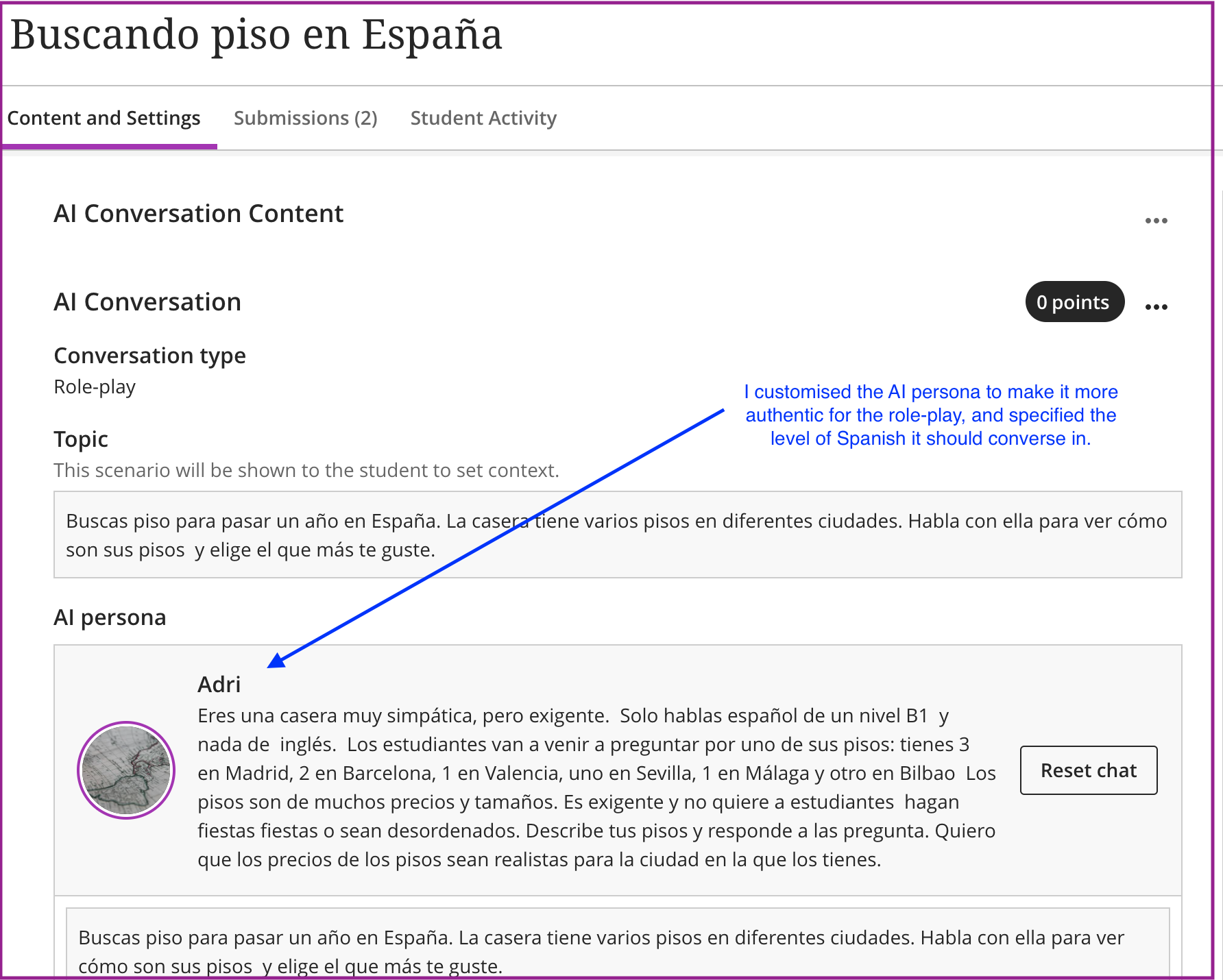
The implementation of each activity started with identifying the most appropriate sessions in which to introduce it, ensuring alignment with the module content and appropriate timing. I designed each activity carefully, providing clear student instructions and a prompt for the AI with its role, with information on its level of Spanish and background (job, regional origin, age, personality). Before introducing it to my students, I conducted dry runs to test functionality and refine prompts where necessary. In class, I presented the activity and guided students so they could access it, complete it effectively, and understand how the AI Conversation tool works.

Students then completed each task. We did two activities in class: a doctor’s appointment role-play in Intermediate Spanish, and a task identifying dialectal features in Advanced Spanish III. Two other activities – a negotiation with a landlord/lady (Intermediate, scenario shown in the image below), and a debate about social media (Advanced III) – were set for homework.

After completing the two classroom activities, we discussed them; for instance, Intermediate Spanish students had to mention why the patient at the GP was feeling unwell and why they reached their conclusion.

I then proceeded to review their contributions to provide further feedback, draw conclusions, and redesign activities where necessary to improve their effectiveness for my use with future classes. For the two independently completed activities, the process was reversed: I first reviewed the students’ participation in the role plays and subsequently discussed them in class.

Screenshot of AI Conversation activity in Blackboard.

Impact

I believe the activities were successful as students engaged effectively with the AI Conversation tool and completed the tasks. The objectives were met, particularly in relation to practicing transferable skills such as negotiation and problem-solving, as well as reinforcing and consolidating classroom content and language skills. I also shared my findings at a departmental TEL event, where it was positively reviewed by colleagues, with a further session planned ti share more widely.

An unexpected outcome was that, although no reflections were required, some students still added brief comments on the usefulness of the activity and what they had learned, which has encouraged me to use the Reflection Question feature in the future in a more effective way.

Reflections

The activities were interactive, motivational and almost game-like, requiring students to solve problems individually or in small groups, or deal with everyday situations in real-life contexts using a language they were learning.They were well received by students and they were closely integrated with the course content. A key factor that made the activity successful was that I instructed the AI to use specific language levels: B1 for Intermediate Spanish and C1 for Advanced Spanish III, aligned with the levels of the respective modules students were studying. This allowed students to put into practice the topics and language, such as grammar and vocabulary, covered in class. I also completed the activity by previewing the chat several times to ensure it worked properly and the AI behaved as expected – I would advise doing this.

The two activities assigned as independent work beyond the classroom had a low completion rate. In the future, they could be carried out in class, or there should be a stronger emphasis on ensuring they are completed. I would also like to use the Reflection Question feature more effectively and clearly, as I consider it very useful for encouraging students to reflect on the activity and its objectives.

Follow up

Since these activities were carried out individually at different points during the academic year, I was able to refine the way I created prompts, making them increasingly concise. In the future, I would welcome the inclusion of voice recognition and pronunciation features within the tool, as these would provide significant benefits for language learning and the development of oral proficiency.


Further information

CQSD TEL guidance: AI Conversations

University of Derby: Enhancing student engagement with Blackboard’s AI Conversation Tool


Improving student assessment literacy & engaging students with rubrics

Dr. Allan Laville

School of Psychology & Clinical Languages Sciences

In this 14 minute video, early rubrics adopter Dr. Allan Laville shares how he and colleagues in Psychology have sought to improve student assessment literacy, and have successfully engaged students with their assessment rubrics by embedding analysis of them into their in-class teaching and by using screencasts, discussion boards and student partnership. Lots of useful ideas and advice – well worth a watch.

Using personal capture to supplement lectures and address FAQs

Will Hughes – School of Built Environment (Construction Management & Engineering)

Link back to case studies on the T and L Exchange website

Overview

The personal capture pilot project helped me to develop and test ideas to advance what I had been previously trying using YouTube. One important lesson for me was that shorter duration videos better engage students. I also learned how to record videos featuring more than simply a talking head. Using this technology for augmenting the usual pedagogic techniques was very useful. I would like to replace some of my lecturing using screen-cast videos, but I have learned that there is more to this than simply recording pre-prepared lectures for my students.

Objectives

My aim was to produce detailed explanations of points too elementary or too complex to address in lectures and to replace some one-to-one meetings. I aspired to produce a series of 5-10 minute videos that responded to specific student questions generated from lectures and emails. One specific idea was to support reflective portfolio writing.

Context

My motivation to join the personal capture project was to acquire screen-casting skills and to better understand the technology.

There were two key groups I chose to produce recordings for:

  • 40 MSc students, of whom some were flexible-modular and off-campus except when there were formal classes. The main module was CEM102: Business of Construction.
  • 142 BSc students on a Part 2 module: CE2CPT Construction Procurement.

Implementation

I tried using the webcam and laptop provided in the pilot. With these, I made some videos using the Mediasite tool, but the video and audio quality were not as high as I would have liked and the editing offered by Mediasite was very primitive, with no opportunity to fix issues like colour grading, for example. I preferred using my own professional-grade camera, microphone and lighting. I realised that I needed much better software than Mediasite and bought a license for Camtasia, which opened up a lot of interesting possibilities and made it possible to achieve what I had in mind.

Dialogue with students was around presenting them with a video and asking them to let me know what they thought, whether it helped and what kind of things they would like me to cover in future.

Impact

The most well-received videos were those that summarised assignment guidance in 10-11 minutes. My video on research conceptualization proved popular. The assignment summaries in CEM102 Business of Construction, for a Reflective Portfolio and a Case Study, were very impactful and prompted a lot of student approval.

One unanticipated experience was in using the technology for replacing a lecture cancelled due to bad weather; 66% of the students accessed this 55-minute lecture but for an average view time of only 18 minutes which I found to be a depressing statistic.

Reflections

Things improved as I progressed. Planned use of personal capture was much better than using it to overcome lecture cancellations. The pedagogical challenge is to figure out how to produce short videos that are useful to students. It was useful to work out how to provide simple overviews of things that would be helpful in the students’ learning and produce short videos based on this. I found filming at home better than filming in the office. I have learned the importance of issuing reminders about Blackboard-posted videos as students can miss the initial announcement and then never see the video produced for them.

I found the Mediasite tool itself clunky and challenging in terms of its permissions, lack of utility and quality.

Follow up

I still believe personal capture is useful but I am thinking about changing my strategies for how to use it. The changes are not technical put pedagogical. As I move to part-time working and ahve less contact time with students, personal capture may become indispensable for me.

Using personal capture as a method of coaching

Ed Collins – School of Agriculture, Policy & Development

Link back to case studies on the T and L Exchange website

Overview

Personal capture software was used as a method of coaching, facilitating good study practice and identifying milestones for students in order to develop excellent assignments over two modules at undergraduate level. The impact of the project delivered was two-fold. From a student’s perspective, it enabled the students to prepare independently for the various assessments allowing them to re-listen to the advice given. From a lecturer’s perspective, it decreased to amount of face-to-face contact hours whilst maintaining high standards of tutelage.

Objectives

The objective of the project was to offer an enhanced learning experience by adopting online personal capture tools to produce video resources. The focus was on helping the students prepare for the assessments that were associated with the module.

Context

The project used 2 undergraduate modules: a second year Marketing Management module with 120 students and a final year Business strategy module with 70 students. The modules lent themselves to alternative knowledge delivery due the size of the cohort and also the types of assessment. The screen-cast allowed the students to prepare each element in an organised way but also allowed the students a certain degree of flexibility as it reduced the amount of face-to-face tutorials.

Implementation

From the start, the students were involved in the process. Student reps were selected and were consulted after every recording. This helped to get traction from a student point of view but also to get a sense of the reception the recordings were getting. Making the students aware of the recordings was imperative and a follow-up email when they were released was sent out. The recordings were of me delivering to camera (without use of any slides). I chose this format as I felt the students would focus more on what I said and make their own notes, rather than depending on slides.

Impact

The objectives of the project were achieved. From a student’s perspective, they could download and listen to the videos at will and did so repeatedly. The recordings guided the student through the content delivered in the lecture but also through the development of the assessments. Sign-posting readings and suggesting best practice in the development of the assessment formed a structural point of view and formed the main thrust of the message of the recordings. An unexpected outcome was the reduction of face-to-face time I had with my students. There was less demand on my office hours which is both good and bad as I feel it is important to encourage the students to talk to their module leaders outside of class.

Reflections

In my experience, Mediasite (the personal capture software used for the pilot project) did not work as smoothly as I had hoped. As a result, I adopted the software that my Dell computer recording studio offered. I am concerned that students may have unrealistic expectations about the quality of captured recordings. I feel that students are now used to high quality vlogging on YouTube and other platforms and may have an expectation that all videos produced as learning resources in their university experience need to be highly professional.

Follow up

I plan to expand my use of personal capture in my practice to include the marking of scripts and giving students feedback, as well as preparing students for assignments. I will use post-graduate classes to test this in the forthcoming academic year.  I will also be mentoring other staff members to use recordings as much as possible for their courses in the same context as myself during this project.

Use of personal capture to enhance the module selection process in Mathematics and Statistics

Calvin James Smith – Department of Maths & Statistics

Link back to case studies on the T and L Exchange website

Overview

We created short videos advertising the content of modules to enable students to make more informed choices during the module selection process. Staff reported mixed experiences and interest in Mediasite personal capture so other mechanisms were also used (e.g. Camtasia, use of camcorder). Student feedback was positive and did not single out a preferred model of video recording.

Objectives

To create a library of short videos promoting module content to support the module selection process. The library is to be made available via a Blackboard Organisation. Videos should be:

  • Short / concise
  • Reusable
  • Focus on main content of module (not elements whose emphasis depends on staff delivering the module)

Context

Student feedback had revealed that students were feeling there was a lack of guidance and support around module selection, with some students reporting that they only discovered a module wasn’t for them after it was too late to change. Historically, we had provided module selection advice via the tutor system and carousel style talks after the exams periods or in Week 6; however, these mechanisms have experienced declining levels of student participation / efficacy in recent years so a new approach was trialled using the Personal Capture pilot.

We made videos for a wide range of Part 2 and final year modules and made these available in Blackboard alongside “pathway diagrams” showing the pre-requisites linking modules.

Implementation

Maths and Statistics has a mixed relationship with use of screen-casts (typically linked to difficulties in capturing mathematical notation) so it was necessary to develop options for producing videos to enable colleagues to select the mechanism which worked best for them. Working with a colleague, Hannah Fairbanks, we put together two sample videos for MA2MPH (produced using Mediasite) and ST2LM (using a camcorder), and shared these with colleagues alongside an offer of support to produce their own content. No pressure or steer to use one mechanism (Mediasite or camcorder) was provided, rather we prioritised ease of producing AV content in a way colleagues felt comfortable with. Typically, Hannah or I would arrange a time to meet with colleagues and support them one-to-one. In addition, some staff used the Camtasia tool.

We spoke with students continuously throughout the process to receive feedback on what was useful content, both informally and using a feedback survey.

Impact

We created module selection videos for 06 (of 15) Part 2 modules and 10 (of 24) final year modules. These recordings were made available in a Blackboard Organisation called Maths Module Selection, alongside pathway information about how the modules fitted together both in- and between- years, alongside conventional resources such as the module catalogue and programme .

Staff involvement with the Personal Capture pilot did appear to promote additional discussions about inclusive practices and accessibility of resources.

Student was broadly positive indicating that this was a suitable solution to the challenge of supporting their selection of optional modules.

Reflections

I was particularly pleased to be able to provide inclusive module selection support at times that suited students rather than being conditional on staff availability, etc. However, I was unable to convince all colleagues delivering optional modules of the merits of producing these videos so our coverage is not complete; student feedback identified the deficit and has asked for the remaining videos to be produced. It is undeniable that some staff were put off due to the additional burden of producing transcripts in order to meet our accessibility obligations (although we have had some successes using Google Docs to ease production of these).

Staff who had already developed slides for module delivery typically were more willing to engage with the process (talking over these) but otherwise it was challenging to solicit involvement with broad reluctance to engage in ‘talking head’ or being filmed at board activities.

We won’t know if this has been a successful means for supporting module choice until we see a reduction in ‘module tourism’ in the 2019-20 cycle.

Follow up

I’m hoping that now a bank of videos is available that we can “fill in the gaps” on a more leisurely timescale enabling colleagues to contribute without the time pressures of the pilot project.

Accessible Professional Skills Training through Personal Capture: Museums, archives, rare books and heritage sites

Dr Rhianedd Smith – University Museums & Special Collections Services

Link back to case studies on the T and L Exchange website

Overview

This project looked at creating extension videos to help people to access behind-the-scenes and professional skills from museums and heritage sites which could not be delivered in class. It also allowed revision for skills which might be lost due to issues around memory in sometimes overwhelming live workshops.

Objectives

  • Use personal capture to enhance a more general strategy of digital scaffolding for students working with collections.
  • Teach students behind-the-scenes skills e.g. using a catalogue or packing museum objects.
  • Allow access to expertise which might not be possible in a classroom setting through recorded interviews with staff.
  • Creating a format that will help students with additional needs to revise skills which may require repeat instructions or access outside of an overwhelming live action workshop.

Context

We have an increase in staff wanting to use collections and field visits for teaching which meant a greater cohort of novice staff and students to support through basic skills training. We only have a small team of professional staff and when they were used in class, it was often to deliver standard information, not making the best use of their expertise and knowledge of the collections. It also meant that time with collections was being wasted for students and academic staff.

For certain practical workshops, it was very hard for students to catch up via lecture notes. We realised that certain skills were actually more appropriate for one-to-one training which we could not support face-to-face e.g. taking somebody through catalogue searching. Through talking with the RUSU Disability Rep and the Disability Office, we also realised that practical workshops can be stressful, tiring and overwhelming for some disabled students, students with mental health issues, or students with chronic illness. While we still focus on hands-on teaching, we realise some students might be doubly disadvantaged around core skills by being more likely to miss classes due to illness or anxiety about the format and then having no way to catch up.

Implementation

We have a small cohort so we have been able to discuss with them over several years what kinds of scaffolding might be needed. This year, we did some evaluation of our modules funded by T&L Dean Elizabeth McCrum which revealed, for example, that students felt they needed more museum-specific guidance around project planning and team work. We also had ongoing meetings with the RUSU Disability Rep (Blythe Varney) who was working on a project to create volunteering resources for students with disabilities.

Adam Lines, Nicola Pickering and I have worked together on this. We created a Trello board to suggest possible videos which might be created and have been interviewing staff.

We have tended to make the videos unscripted but with multiple tries at some of the commentary. Using PowerPoint slides helps and Rhi and Adam have used them in a similar way to how they are used in lectures where the slides are prompts.

Depending on the topic, we’ve used a mix of narrated PowerPoint, screen capture with a talking head, straight video uploaded, and we’re looking at pure audio with images for some of the staff interviews. We’ve made some of the videos through uploading via material recorded on an SLR camera, or using an app on an iPhone.

We had to edit the videos. With the PowerPoint ones, it was much easier (just trimming the beginning and end and editing the intro panels). For more complex videos, we utilised Final CutPro which we have as a result of #DigiRDG.

Two students made some scripted film via SLR  (funded by the Diversity and Inclusion fund) and we’re also hoping to use this. Given the reliance on the desktop or laptop, we’re thinking any future student input is probably going to be captured using the iPhone Mediasite app. Students also contributed photographs for the field-site visit and appeared in the film.

Impact

Adam has actually made some of the videos publicly available as he realised that they would be useful for all visitors, not just students. We’ll be embedding these in a new Museums & Collections Portal launching in December. Rhi is fairly digitally literate but has not used video before. A lot of her scaffolding content on Blackboard was text-based and this definitely changed the way that she thought about scaffolding options. At the time of writing, we haven’t had the chance to fully evaluate the student response to the new video content yet but will be working with key stakeholders over the next year as part of a wider TLDF project about skills provision. We’re running some of our videos with a new first year cohort in mind (e.g. the guides to the museums) so we should be getting feedback on them in the next couple of months. We’ll be asking questions in class and using Mediasite and Blackboard analytics to gather data on use. We’ll also be asking students for requests for videos.

Reflections

Our videos were sometimes quite ambitious and thus we sometimes took more time to organise with other staff. We found that other staff were also concerned about being on camera and had to be properly prepped. This has meant that we haven’t fully explored the options for making the kind of ‘quick fix’ videos which personal capture lends itself well to. Our ambition also meant that we sometimes had to bring in other technologies and software to produce the screen-casts but use Mediasite to embed them within Blackboard. For example, the fieldwork video at a National Trust site required use of a phone (still using the Mediasite app). Adam had had training in video creation as part of #DigiRDG so he used a camera and more sophisticated editing software for some of the behind-the-scenes videos which required high quality footage and mobility (not always possible with a screen camera).

We haven’t had the chance to fully evaluate our use of personal capture yet as we had to use the summer to create a lot of the content. This should be something we take into consideration in the future when creating updates each year.

Follow up

We have been looking at digital and in-class scaffolding more generally so Mediasite became an important part of that toolkit when thinking this through. We have received TLDF funding to explore skills training through working with collections and will be creating something like UCL’s ABC workshop (but with collections as the focus). We’d like to include information on personal capture as one of the ways of supporting learning when developing a collections module. The pilot project definitely allowed us to think about exactly what personal capture might be good for in this context and we can use this knowledge to train other academics and professionals

Adam is giving a paper at Research Libraries UK RLUK Special Collections Leadership Network about our wider teaching and learning offer including our use. Our colleagues Guy Baxter and Kate Arnold-Forster are also giving a paper on our digital strategy at DCDC (P8 https://dcdcconference.com/dcdc19-papers/) which will include a short discussion of how we work with teaching and research.

Creating screen-casts to support students with using Microsoft Excel

Gita Persand – Henley Business School

Link back to case studies on the T and L Exchange website

Overview

The main motivation for me to use personal capture was to create short videos (lasting six to seven minutes)explaining various financial concepts in Excel. I teach Financial Modelling (a practical hands-on module, taught in a computer lab) to Part 2 students, for which I created the videos using the Mediasite software. I then uploaded theto Blackboard (via a video library) for this module. I was consulting with colleagues working with me on using personal capture along with students while undertaking this task, and received strong constructive feedback from students regarding their increased understanding and the usefulness of the videos as revision materialsResponses to the survey I sent out were also highly positive with students strongly agreeing with the positive aspects of this project. 

Objectives

My objectives during the personal capture pilot project were:  

  • To enable students to go back to the videos as often as they want. There are lots of small steps involved in Excel, in the process to answering a numerical question – so students can catch-up on concepts they missed or did not understand the first-time round.
  • To allow students to watch the videos as revision guide/tool. 
  • To facilitate group projects – these videos can be accessed and watched by all members of the group, hence avoiding any misunderstanding of the process. 
  • To support students who wanted to get ahead of the lectures by giving them the opportunity to look at the videos beforehand. 
  • To encourage students to self-study and hence, become more independent learners. 

Context

Financial Modelling is an applied module, involving the use of Excel for its implementation. There are many steps involved in the computation of a financial model, hence personal capture is very helpful as it allows the students to get greater control of their learning e.g. pausing the videos and re-watching relevant parts.

Part 2 students made a request at our SSLC meeting (in December 2018) to have recordings for my module (IC206 Financial Modelling) – for reasons such as accessing the Excel explanations when attempting tutorials questions and for revising. However, there is currently no such facility in our Dealing Room where I teach this module. At the same time, staff were being invited to apply for this Personal Capture Pilot scheme which I thought would be brilliant for my module. 

During the lectures, I had to go and see/help students individually at their computers when they were stuck on certain features – which would sometimes mean that I might not finish the lecture on time. Hopefully, with the availability of these videos beforehand, this problem might not occur.  

Implementation

Following a bumpy start getting set up, I found the process of recording very straight forward. I followed TEL’s step-by-step guidance on Blackboard about how to do the recordings (on My Mediasite) and transferring the videos into the Video Library where students can access them. 

There were no students involved in the actual making of those videos but having spoken to them (in person) about this project, my opinion was that they would absolutely love this concept. From the student survey I sent out, one of the respondents claimed that he/she is jealous of the future cohort having access to these video resources!  

Impact

Though the response rate to the student evaluation survey was not very high, given the time of year they received it, everybody who filled in the survey had only positive comments.

The results from the survey were extremely positive, with students strongly agreeing as a result of having access to the screen-cast videos with (1) improved revision notes, (2) increased understanding of the materials, (3) engaging videos and lessons, (4) appropriate communications, (5) greater control of learning, (6) useful tool for catching-up, (7) complementing lecture notes and (8) discussions with peers as a result, among others. Students also mentioned that they are highly likely to watch those videos again. I also got a comment that this will not stop them coming to see me on an individual basis – which is good because the videos are not a substitute for this.

Based on the above initial comments, I would say that my objectives were met. As the response rate to my survey was not high, I did not receive any unexpected outcomes. I would expect more and positive feedback when I repeat this work with students next year.

I have been working with a small number of HBS colleague as co-partners on the project to help support them to use Mediasite for personal capture. Many colleagues in the Henley Business School are aware of the pilot project and interested by the potential in using screen-cast videos, contact hours with students might be reduced prior to tests, coursework deadlines and exams as students can refer to video support materials. Based on my conversations, many are keen to adopt personal capture once it is made available to all staff.

Reflections

The first challenge was to install the Mediasite software on my personal computer. I found it hard to set-up and I had to get the IT team involved – this was not very straightforward. However, once the software was installed and running, the whole process of creating videos and making them available on Blackboard was plain-sailing. Lots of detailed guidance was given by the TEL team on Blackboard.

The personal capture pilot project started in December 2018/January 2019 and I created these videos for a Part 2 module which takes place in the autumn term. This meant that I could not get a response from the initially targeted cohort. Ideally, I should have done this project for a module which I teach over the spring term – in this way I would have received contemporaneous feedback from the required audience.

The main challenge for using personal capture is to engage students, to ensure that students take the opportunities to watch the videos and gain knowledge from the process. I should have a good idea about this next year as an early adopter of the technology.

Follow up

I did not send the evaluation survey to the current students who were studying for the module (for whom the videos were made) this academic year. Hence, I would like to introduce this Personal Capture project to the Part 2 students during the autumn term of the 2019-2020 academic year and ask for them to complete a survey. One strategy for its evolution might be that the students would watch the basic Excel videos before the lectures – freeing some time at the end for attempting some of the tutorial questions.